Why a Single API Call Isn't Enough
You can call an LLM from a script in five lines of code. But production AI isn't a single prompt — it's a chain of decisions, validations, transformations, and handoffs that must run reliably, at scale, every day.
Fragile Pipelines
One failed step in a Python script silently breaks the entire chain. No retries, no fallback, no visibility.
Integration Spaghetti
Connecting Sheets, Slack, CRMs, and LLMs means maintaining dozens of API clients and auth flows.
No Observability
When your AI pipeline fails at 2 AM, can you see which step broke? Can your non-technical PM debug it?
Scaling Complexity
Adding a fact-check step or switching LLM providers shouldn't require re-architecting the entire system.
What Is Orchestration, Simply?
Orchestration is the practice of defining, sequencing, and managing multi-step workflows where each step can involve a different service, model, or application. Think of it as a conductor directing an orchestra — each musician (service) plays their part, and the conductor (orchestrator) ensures they play in the right order, at the right time.
A well-orchestrated workflow turns an LLM from a "smart text box" into a production system — with error handling, conditional logic, data persistence, and cross-application connectivity baked in.
Why Make.com for LLM Workflows
Make.com is a visual orchestration platform that connects over 2,000+ applications through a drag-and-drop canvas. For LLM workflows specifically, it offers something code-based solutions don't: visibility, speed of iteration, and operational resilience.
Visual Scenario Builder
Native LLM Modules
Routers & Filters
Built-in Error Handling
Execution History
Scheduled & Webhook Triggers
Anatomy of a Real Scenario
Let's look at two production scenarios we've built. These aren't demos — they run daily, processing hundreds of records with LLM-powered intelligence.
Multi-Path LLM Processing with Structured Output
The Router is the key module here. It evaluates a filter condition — "Enterprise Lead" vs "SME Lead" — and sends each record down a different path. Each path has its own Claude prompt, tailored to evaluate leads against different qualification criteria. The text parsers clean up the LLM response before JSON parsing extracts structured fields like fit score, buying signals, and recommended next action.
This pattern — branch, process, structure, store — is the backbone of scalable intelligent automation across industries.
Strengths
Considerations
Quality Assurance Through LLM-as-Judge
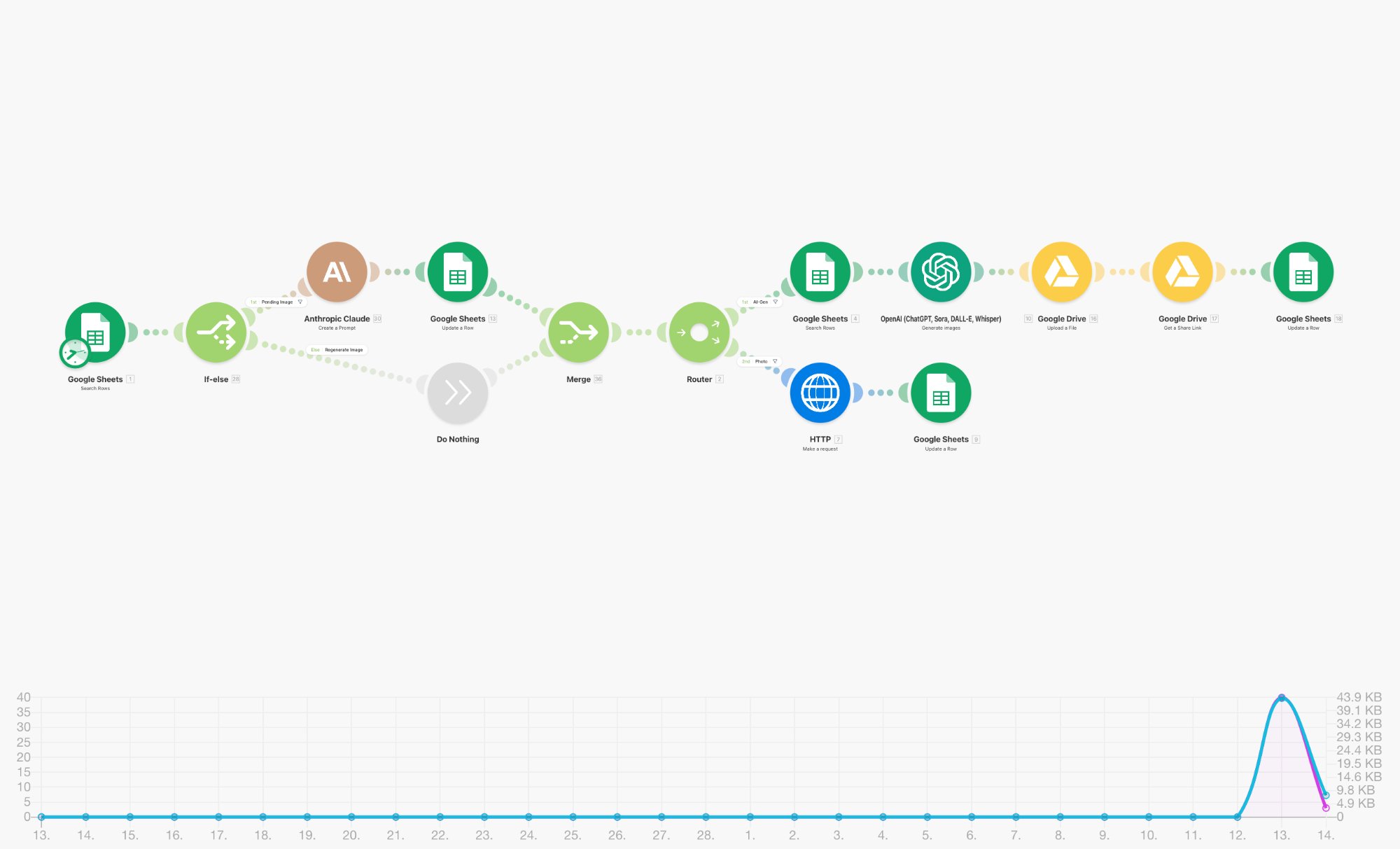
This is the LLM-as-judge pattern. The first Claude module acts as a fact-checking gate — it evaluates content against criteria and returns a pass/fail signal. The Router reads this signal and branches: passing content goes to a separate Scoring Module (another Claude call), while failures are written back to Sheets with rejection reasons.
The two-stage LLM evaluation (fact-check → score) creates a quality pipeline that mirrors how human editorial teams work — first verify, then rate.
Separating fact-checking and scoring into two distinct LLM calls improves reliability. A single mega-prompt that tries to do both tends to cut corners. Dedicated modules produce sharper, more consistent results.
Five Orchestration Patterns That Work
Sequential Chain
Fan-Out / Fan-In
Gate & Route
Enrichment Loop
Human-in-the-Loop
Real production systems combine these patterns. The Lead Qualification Pipeline above uses Gate & Route + Sequential Chain. The Fact-Check system uses Gate & Route + Fan-Out. Start with one pattern, then layer as requirements evolve.
The MCP Advantage — Connecting LLMs to Everything
The Model Context Protocol (MCP) is an open standard that allows LLMs to interact with external tools, data sources, and services through a unified interface. Instead of writing custom integration code for every service, MCP provides a standardised handshake between the model and the outside world.
Custom Code Per Service
Each integration needs its own API client, auth handling, error management, and data transformation logic. N services = N integration layers.
Unified Tool Interface
The LLM describes what it wants to do, and the MCP server translates that into the right API call. Add a new service? Add a new MCP connector — the LLM doesn't change.
In orchestration platforms like Make.com, MCP complements the visual workflow by enabling LLM-initiated actions. While Make handles the macro flow (trigger → process → store), MCP lets the LLM itself decide which tools to call within its processing step — turning a static prompt into a dynamic, tool-using agent.
A Claude module inside a Make scenario receives a customer support ticket. Via MCP, it searches the knowledge base, checks the customer's account status, and drafts a response — all within a single orchestration step. Make handles scheduling and error recovery; MCP handles the tool calls.
Multi-LLM Strategies
Not every task needs the same model. A multi-LLM architecture assigns the right model to the right job — optimising for cost, speed, and quality simultaneously.
Use a lightweight model for triage, a mid-tier model for structured extraction, and a frontier model for complex reasoning. Make.com's Router module makes this trivially easy — a filter condition evaluates task complexity and sends it down the right path.
This isn't theoretical. We run production systems where Claude handles nuanced content generation, a smaller model handles classification and tagging, and the output of both feeds into a unified store. Cost drops by 40–60% versus using a frontier model for everything.
From Workflows to Agents
There's a critical distinction between a workflow and an agent. A workflow follows a predetermined path — step 1, then step 2, then step 3. An agent decides its own path based on intermediate results.
Deterministic Path
You define every branch in advance. The system follows your map. Predictable, auditable, reliable.
Dynamic Path
The LLM decides which tool to call next, when to loop, and when to stop. Flexible, adaptive, powerful.
Make.com sits at an interesting inflection point. Its visual builder excels at workflow orchestration — and with MCP-enabled tool use, it can also support agentic behaviours within individual modules. The LLM module becomes a "mini-agent" that uses tools dynamically, while Make handles the surrounding infrastructure: triggers, error handling, data persistence, and cross-application routing.
Orchestrated agents combine the best of both worlds. Make.com manages the macro flow (schedule, trigger, route, store), while MCP-enabled LLM steps handle micro-decisions (which tool to call, how to respond, when to escalate). This gives you agentic intelligence with operational guardrails.
Enterprise capabilities without enterprise complexity
Agentic AI systems have traditionally required significant engineering investment — custom agent frameworks, deployment infrastructure, monitoring systems. Orchestration platforms like Make.com democratise this capability. A small team can build, deploy, and monitor intelligent automation that would have required a dedicated ML-ops team eighteen months ago.
Teams using visual orchestration platforms report 3–5× faster iteration cycles for AI workflows compared to code-first approaches. The visual canvas makes it trivially easy to swap LLM providers, add processing steps, or modify routing logic — changes that would require code reviews and deployments in traditional architectures.
How to Choose — A Decision Framework
Start with a Single Scenario
Pick one repetitive task that involves an LLM call + an external service. Content generation, lead scoring, support triage — anything with clear input/output. Build it as a linear chain on Make.com.
Add a Quality Gate
Once the basic chain works, add a validation step. Use an LLM-as-judge pattern to check output quality. Route failures to a review queue. This single addition dramatically improves output reliability.
Introduce Multi-LLM Routing
Not every input needs the same model. Add a Router that evaluates complexity and sends simple tasks to a fast/cheap model, complex tasks to a frontier model. Watch your costs drop.
Enable MCP for Tool Use
When your LLM needs to reach outside the scenario — search a database, check a calendar, read a document — enable MCP connectors. The model becomes tool-aware without changing your orchestration logic.
Scale to Agentic Patterns
Once your team is comfortable with orchestrated LLM workflows, explore agentic patterns. Let the LLM decide routing within a step. Add feedback loops. Build systems that improve with use.
Ready to orchestrate intelligence
into your operations?
From content pipelines to quality assurance agents — we design, build, and deploy LLM-powered workflows tailored to your business.
Let's Build Together →